Skip to content
Sign up free
News

Navigating Politics: Data Visualization

Navigating Politics: Data Visualization

By Ian Dawes

1-minute read

Source: fagstein.com
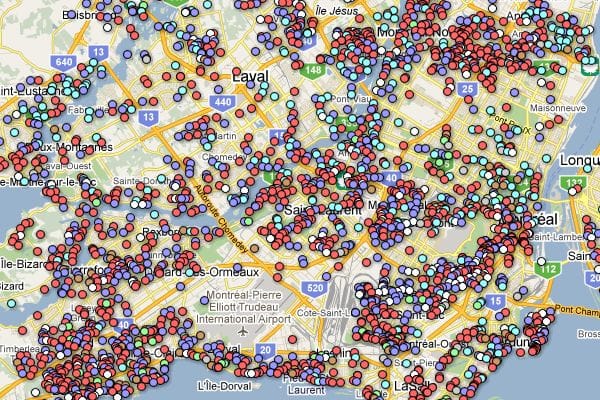
Data Visualization:

There are so many ways to get what you have discovered out there for the world to see. One of the better more user friendly data visualization methods  I have been steadily learning is Google Maps.  It has been a challenge throughout. Google does provide, however, a very user friendly tool for geospatial and demographic data visualization called Google Fusion tables. This tool allows for easy upload of data in spreadsheet format and will visualize it in a Google Map. The data, of course, must have a location associated with each record.

Say you would like to show the voter turnout percentages from the last Primary election for your State’s Congressional districts.

The data visualization process for this projects criteria would be:

  • Find and collect the data (shapefile of district boundaries, election stats from Secretary of State)
  • Format the data into a useable layout
  • Merge the data together based on a common field
  • Import into your Gmail docs account as a Fusion Table (for this project)

The Fusion Table web app is intuitive and will recognize any spatial data as location (geographic coordinates, etc.). From there you can style your map with a user interface of design tool menus and click embed to get an embed code for your website or copy and paste the code into a .txt (notepad) and save as html to show your audience. Click here for some examples how Google Fusion Tables can help you with your data visualization.

Tags: News

Adhere to the IVN etiquette

By posting a comment, you agree to adhere to our etiquette rules: No partisan attacks, no personal attacks, substantiate your sources, no self-promotion.

Get IVN’s Free Weekly Newsletter:Get IVN’s Free Newsletter

Get IVN’s Free Weekly Newsletter:Get IVN’s Free Newsletter

Nonpartisan Issues. Diverse Perspectives.

Check your inbox and click the link to confirm.

Republish this article

Republishing guidelines

Republish IVN articles for free. Independent Voter News articles may be republished online or in print under a Creative Commons BY-NC-ND 4.0 license, on these terms:

  1. Credit the author and IVN. Keep the byline ("By Author Name, Independent Voter News") and the attribution note at the end, which links to the original.
  2. Keep the meaning. You may update time and place references and apply your house style. You may trim for length, as long as the cuts don't change the meaning or misrepresent the author. Keep the headline. Mark any additions as your own (for example "Additional reporting by ...").
  3. Translations are welcome. Translate faithfully, add "Translated from English by [your outlet]", and tell us at editor@ivn.us.
  4. Keep the links, including the link to the original article.
  5. Keep the tracking image. The HTML includes a 1-pixel image that counts readers on your page. It collects no personal information.
  6. Photos and illustrations. Images credited to IVN may be used with this article only. Images credited to others (AP, Getty, Unsplash, Wikimedia and so on) stay under their owners' terms. Secure the rights or switch "Include images" off.
  7. Don't sell it. You can't sell our articles or sell ads specifically against them. Your normal site advertising is fine.
  8. No implied endorsement. Don't suggest that IVN or the author endorses you, your candidates or your causes, or that donations to you support IVN.
  9. Keep labels. Opinion or analysis pieces keep that label.
  10. Point search engines to the original. Set the canonical URL of your copy to the original IVN article (the HTML we give you includes the tag).
  11. No bulk or automated republishing, and don't submit our articles to aggregators (Apple News, Google News, MSN) as your own.
  12. Corrections and removals. Update your copy when we correct it, and remove it promptly if we ask. We'll contact you at the email you give us.
  13. Questions or print republication: editor@ivn.us.

IVN staff: fill in who you're inviting above, then create the invite.

Preparing the article

Navigating Politics: Data Visualization

Choose a format
  • HTML
  • Email HTML
  • Markdown
  • Formatted (.docx)
  • Plain text
  • WordPress blocks
  • PDF
Choose a platform

Photos credited to others need their owners' permission.

To for

Republishing somewhere else? Questions? editor@ivn.us